

Authorization
Overview
Most requests to the Redivis API require an appropriately set Authorization header in the HTTP request. In most cases, you should use the Python, R, or Javascript client libraries to handle authentication and communication with the API. However, if you would like to interface with the REST API directly, you can either use OAuth or an API token to authenticate your API requests.
Scopes
When generating authorization credentials, you must specify the scopes associated with the credential. This allows you to control what actions any given token may perform. It is highly recommended to limit the scopes to the minimum necessary for your required functionality.
The following authorization scopes are available:
public
This is the default scope, and is present on all tokens. It only allows access to resources on Redivis that are publicly available (e.g., if you were logged out).
Access tokens that only have the public scope can be safely shared with others, and are useful for building integrations that should only access public content (for example, surfacing Redivis datasets through your library's search engine).
data.overview
Allows for "overview" access to datasets that you can see but are hidden to the general public. This will reveal the dataset's existence and some documentation, but will not provide access to restricted variable names, summary statistics, or data.
data.metadata
Allows for "metadata" access to datasets whose metadata you can view but are hidden to the general public.
data.data
Allows for data access to a dataset's full tables (and their derivatives) when it is available to you but hidden to the general public.
data.edit
Allows you to create, edit, and delete datasets.
workflow.read
Grants read access to workflows and their node contents.
workflow.write
Grants write access to workflows, including ability to run notebooks and transforms programatically.
organization.read
Grants read-only access to administrative information about any organization that you are an administrator of.
organization.write
Grants the ability to change administrative information within your organizations, such as members' status and approvals.
Authentication mechanisms
OAuth
OAuth lets an application act on behalf of your Redivis account, once you've signed in and approved what it can access.
If you're using the Python, R, or JavaScript client libraries, OAuth will work without any additional setup. The first time a request needs authorization, you're asked to sign in to Redivis in your browser. The library then caches and renews your credentials, and only asks you to sign in again when your sign-in ends, or when a dataset requires you to sign in with a particular account (e.g. through your institution's identity provider).
Connecting other applications
Redivis is a standard OAuth 2.0 authorization server, and most OAuth libraries and tools can connect to it with https://redivis.com as the issuer. They configure themselves from discovery documents, which list supported endpoints and protocols:
Authorization server metadata (RFC 8414): https://redivis.com/.well-known/oauth-authorization-server
Protected resource metadata (RFC 9728): https://redivis.com/.well-known/oauth-protected-resource
When a request needs authorization, the API's 401 response has a WWW-Authenticate header that links to the protected resource metadata, and says what's missing, e.g. a scope.
Redivis supports the authorization code flow, for applications that can open a browser, and the device authorization flow, for those that can't (e.g. a script on a remote server). Both require PKCE, with the S256 method. Always request the fewest scopes your application needs.
Identifying your application
The one thing you need to decide is how your application identifies itself, with its client_id:
None
A script or tool run on the user's own computer
A loopback address, e.g. http://127.0.0.1:8080/callback
No. Access tokens last 16 hours
Client ID metadata document
Most other applications, including web apps and MCP clients
One of those listed in your document
Yes, when the offline_access scope is requested
Registered application
You need a client secret, or the device flow with refresh tokens
One registered with us
If enabled for your application
No client ID. Since nothing identifies your application, the authorization code can only be sent back to the user's own computer, so the redirect_uri must be a loopback address (on any port). The device flow also works without a client ID.
Client ID metadata document. Host a JSON document describing your application at an https URL, and use that URL as your client_id (draft-ietf-oauth-client-id-metadata-document). Under this model, there's nothing to register, as Redivis fetches the document when a user first signs in to your application. For example, at https://example.com/oauth/client.json:
The document's client_id must be its own URL, and its redirect_uris must be https URLs, loopback addresses, or a native app's private-use scheme (e.g. com.example.app:/callback). Users are shown your application's name, along with the domain that hosts the document.
Registered application. If your application needs a client secret, or another arrangement, contact us to register it.
A user's sign-in through an application lasts as long as their sign-in on Redivis: it ends after a few days without use (potentially sooner based on datasets' configuration), and after at most 10 days, at which point the user is asked to sign in again. Refresh tokens are only valid until then.
API Token
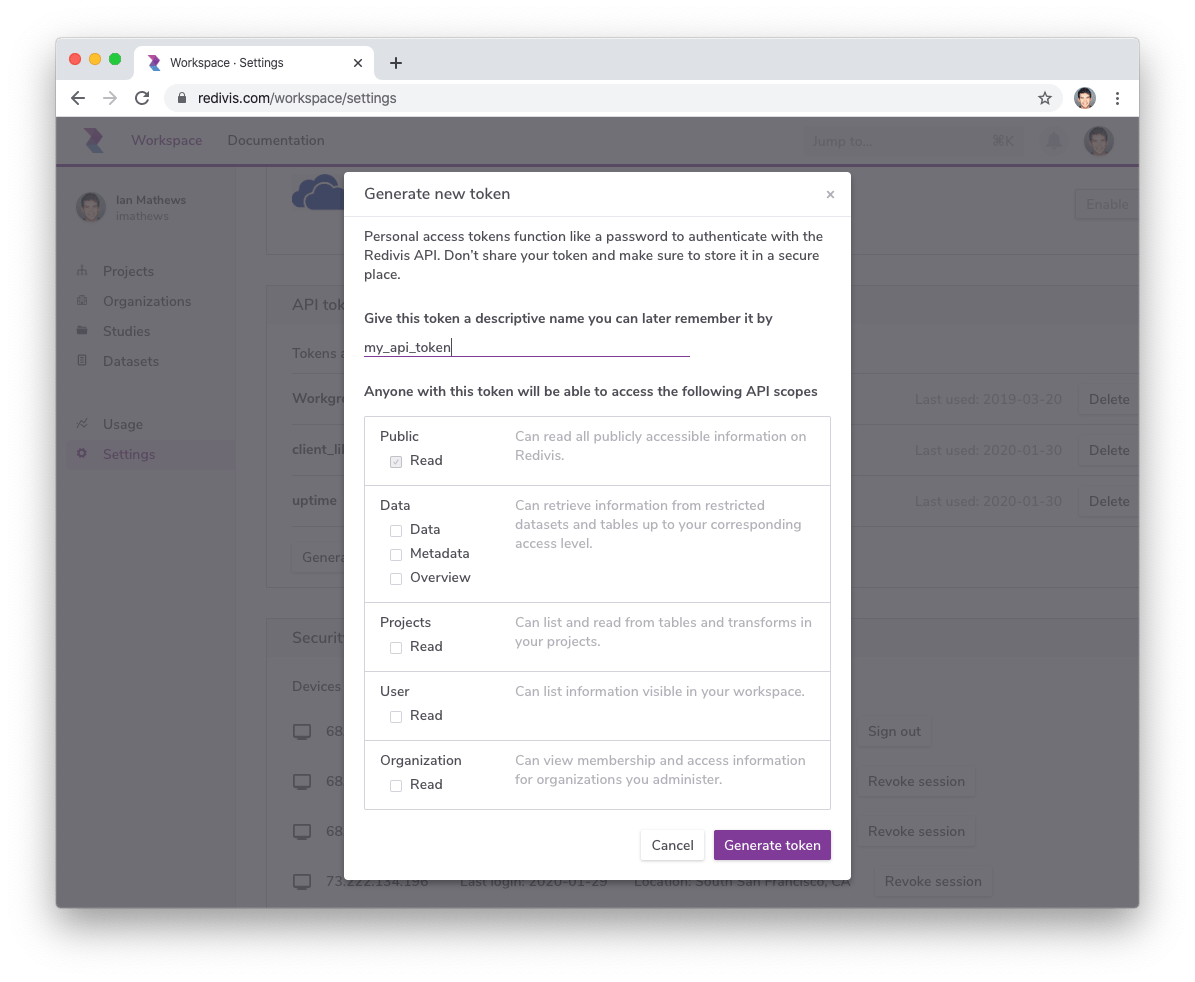
To create long-lived API tokens (e.g., for non-interactive services that continuously interact with the API), you can generate an API token on your workspace. Navigating to your Workspace -> Settings -> API tokens to create a new token.
When you create a token, you will have the ability to name it and grant it specific scopes; the scopes and name can be modified later. When the token is created, you will be able to see the actual token just once — store it in a secure place for future use.
Using Access Tokens
In order to interact with the REST API, you will need to provide your token (either derived from the OAuth flow or your API token) in the header of your HTTPS request. Set the token in the Authorization request header with the value Bearer ACCESS_TOKEN .
If you are leveraging one of the client libraries, you can instead set the env variable REDIVIS_API_TOKEN to your token.
Revoking access tokens
If you have lost an access token, are no longer using it, or if you have reason to believe your access token has been compromised, it is important that you revoke it. Navigate to your workspace settings and press the "revoke" button next to the token in question.
Anonymous access
Public information can be accessed through the Redivis API without a Redivis account or authentication. Anonymous access is available for supported API operations, including reading data through the Python, R, and JavaScript client libraries and downloading small public tables in supported formats.
Reading non-public information, as well as all write operations, require authentication. This includes any endpoints that create resources or background jobs, such as running queries, transforms, and notebooks or initiating exports.
Anonymous API users will also generally experience tighter rate-limiting.
Anonymous download limits
Anonymous downloads are subject to monthly limits based on the owner of the data:
Organizations: 1TB per month across all datasets owned by the organization.
Users: 100GB per month across all datasets owned by the user.
These limits apply specifically to anonymous downloads and are separate from the standard 100GB per-user egress quota.
Export restrictions
Some datasets on Redivis have export restrictions that limit the number of bytes, records, or ip address(es) for data egress. If your request is in conflict with any of these restrictions (for example, your ip address is not in the export whitelist) the API method will return a 403 Not authorized .
These restrictions only apply to actual data content — for example, when reading tables or executing queries.
Last updated
Was this helpful?